
How to Make a Good Instagram Profile: Six Things You Absolutely Must Have
Social media strategy isn’t just one thing. It takes a bunch of different skills to create a cohesive strategy, and as a social media strategist and coach for female founders, it’s my job to teach you! Today, I want to talk about how to make a good Instagram profile. Because you can be posting killer content all the live-long day, but if your profile isn’t pulling its weight, you won’t see the inquiries you’re hoping for.
Why a Strong Instagram Profile Is, Like, So Important
Think of your profile as your digital storefront. Imagine someone (a dream client, if you will) finds you through a post, or comment, or a share. Now, they’re hightailing their way towards your profile where they will take approximately three seconds to decide whether to follow you, reach out, or click away.
Your profile has about a millisecond to convince someone to stick around. Which is why it must immediately tell people who you are, what you do, and who you help. This blog will break down exactly how to make a good Instagram profile that is clear, persuasive, and grounded in your personality.
The Ingredients of a Good Instagram Profile
Profile Picture
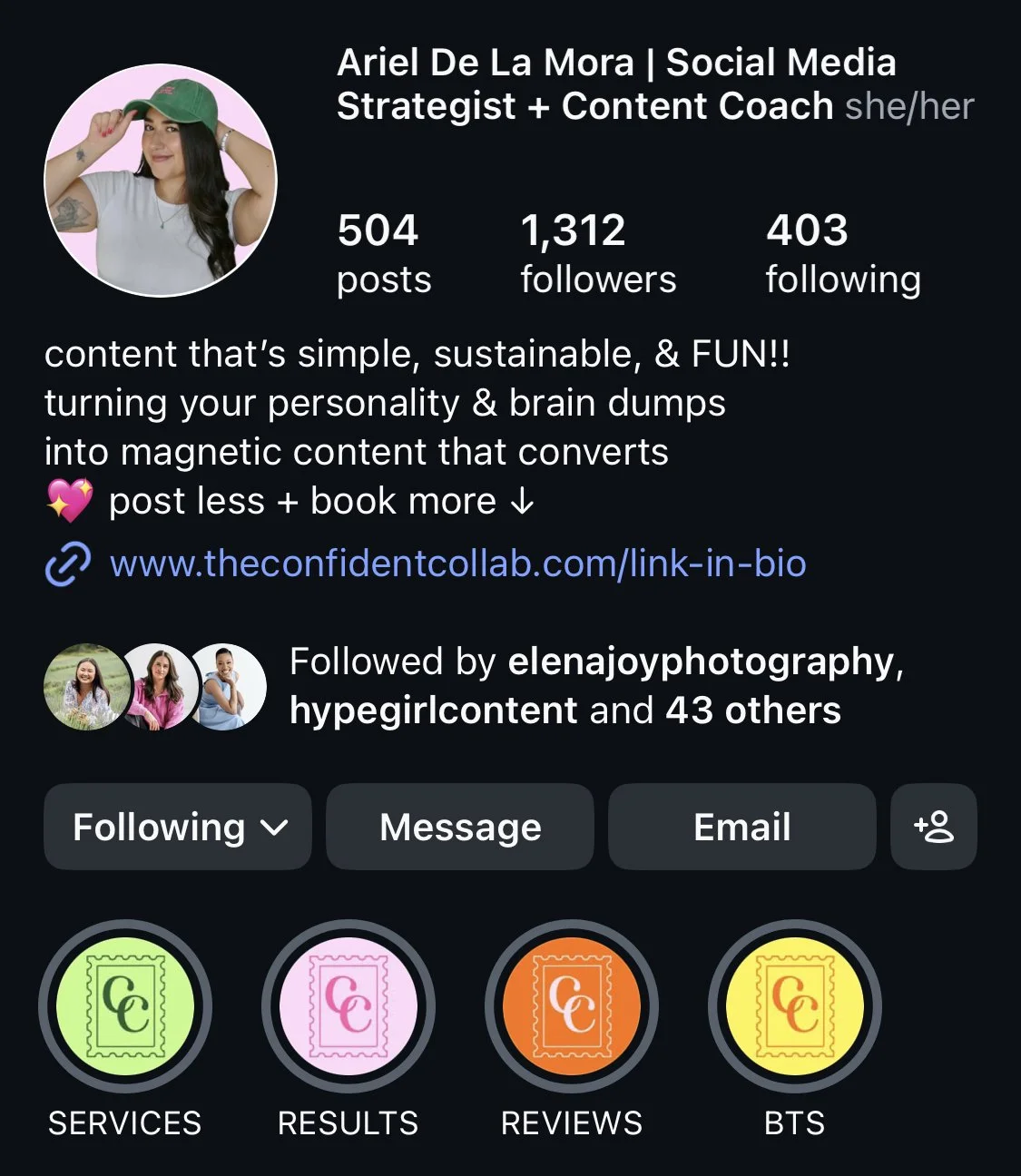
My first piece of advice? Do not use a logo as your profile picture. Your profile photo is an opportunity to connect with your followers. It shows them a bit of who you are and that you are a real, trustworthy, human behind the screen.
Crop it close enough that people can see you clearly, and make sure the background isn’t distracting. Personally, I like to remove the background and replace it with one of my brand colors so it’s clean and on brand, but that’s not necessary.
Whatever photo you choose, make it feel like an accurate representation of you! Don’t choose something from 5+ years ago. Don’t pick something blurry or confusing. This is your first introduction, so be intentional with it!
Name Line
The name line is the bold line at the very top of your profile. Not many people know this, but that line is searchable. So people can go into the Instagram search bar and type in “Wedding photographer in New York,” or “Fitness Coach in LA,” and if you have a strong keyword in your name line, your profile can show up!
Use your name and a keyword (likely your title or job description) that people are actually looking for. For example, mine says: “Ariel De La Mora | Social Media Strategist + Content Coach.” Those are the words people use to search for someone who offers my type of service. A lot of people try to make this cute and unique… and while I love the concept, no one is actually searching for a “Visual Poet.” They want a photographer. If you want to be found, use terms people are searching.
Bio
Your bio has 150 characters to tell someone who you are, what you do, and who you help. That’s it. “Coffee lover, dog mom, Bravo enthusiast” is nice, but it doesn’t belong there. People can learn that from your stories and content. Save the bio for the stuff that actually helps someone decide if you’re for them.
And do you want to know the main thing that helps someone decide if they want to work with you? Your location.
Seriously, I can’t tell you how many times I’ve found a photographer, or hairstylist, or boutique that I’m interested in. Then I go to their profile and can’t find where they’re actually located. And just like that, I’m gone. People are not going to dig through your content or website to find out where you’re located. If your business is location-dependent at all, this is non-negotiable.
End your bio with a CTA that directs people to your links. Getting them off of Instagram and onto your website, or email list sign in, or whatever else you offer is a big win.
Pinned Posts
Instagram gives you the option to pin three posts to the very top of your profile. Even when you post something new, it will show up below your pinned posts. I’m a big fan of using all three.
The first should be an introduction to you. Ideally, this is a carousel that gives people a feel for who you are both personally and professionally. The second pinned post should be about your services. It should include your pricing (yes! Put the actual dollar amount you charge on it!!) and how to work with you. The third post can rotate between social proof, promoting a specific offer, your values, or whatever is most relevant for your business.
Make sure to update these quarterly! No one wants to land on your profile just to find a photo and info from two years ago. These pinned posts are the first thing potential clients will see, so make sure it accurately reflects the season of business you are in!
Highlights
Highlights are the little circles directly below your bio. Here, you can save stories so people can tap through them after the 24-hour story window has expired. These are similar to your pinned posts, but more casual. I recommend an “About Me” highlight, a “Work With Me” highlight, and a Testimonials or Reviews highlight. From there, you can add anything else you like, from results and statistics to behind-the-scenes content.
Be sure to comb through these every once in a while to make sure there’s no outdated information in them. For example, you don’t want your “Work With Me” highlight to have old pricing and offers or broken links.
Learn How to Build a Good Instagram Profile & So Much More
Maybe you’re reading this blog and glancing at your profile, wondering if what you’ve got is good enough. It can be so difficult to self-diagnose your own profile, which is why I offer The Instagram Audit! This one-time service provides a full video walkthrough and detailed document review of your Instagram profile, including everything I mentioned above! But I don’t just leave you hanging—I also give you a new, strategically written bio, and a detailed explanation of what needs to change AND how to actually make those changes.
If you want your Instagram profile to look good, feel authentic, and convert curious visitors into loyal followers (and future clients!), this is a great place to start. Learn more about the Instagram Audit or check out now and get your full review within a week!
